Basics
What Is IPTV? A Practical Guide for UK Viewers
IPTV means watching television delivered over an internet connection instead of an aerial, satellite dish or cable. Here is how it works for UK viewers, and what to check before you pay for anything.
The short answer
IPTV (internet protocol television) sends TV streams over the internet to an app on your TV, streaming stick, phone or computer. You need three things that work together: a compatible device, a player app that runs on it, and a subscription that provides the content, all over a stable connection.
How IPTV works
How a stream reaches your screen
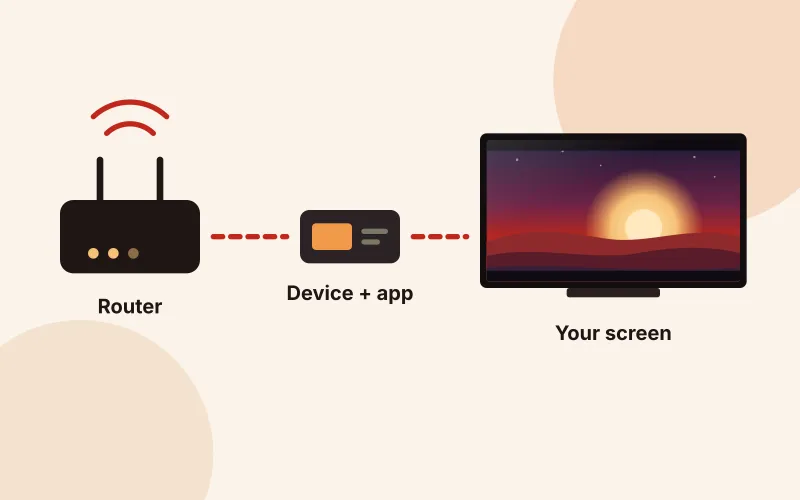
Traditional broadcast TV arrives as a radio signal that every TV in range receives at once. IPTV is different: your device asks a server for a stream, and the server sends that stream as a flow of small data packets across the internet to your home. Your router passes the packets to your device, and the player app turns them back into picture and sound.
Because each viewer receives their own flow of data, the quality you see depends on every link in that chain: the service’s servers, the route across the internet, your broadband line, your home network and your device.
Player apps and subscriptions are separate things
This is the point that causes the most confusion.
- A player app is software that plays streams. Some are free and some charge their own fee. On its own, a player contains no channels.
- A subscription is the service that provides the content. It is only useful if a player app that works with it is available on your device.
So before ordering, ask which player app is supported, whether it costs extra, and whether it is available in your device’s official app store. Our channels page explains how to ask about content.
What UK viewers should check
Device compatibility
Smart TVs and streaming sticks each run their own operating system: Samsung uses Tizen with Smart Hub, LG uses webOS, and Amazon Fire TV uses Fire OS. An app built for one platform will not necessarily exist for another, and older models may not meet a newer app’s requirements. Always check with the exact model and software version. Our guides show where to find them on Samsung, LG and Fire TV Stick.
Connection considerations
Streaming needs a connection that is steady as well as fast. Things that commonly affect it:
- Wi-Fi signal weakens with distance, walls and interference, especially for sticks tucked behind a TV.
- Ethernet (a cable from the router) usually gives a steadier connection than Wi-Fi, where it is practical.
- Other activity on your network, such as large downloads, game updates, video calls or cloud backups, competes for the same bandwidth.
- Picture quality: higher resolutions use more data, so a connection that is fine for one stream at standard quality may struggle with several high-resolution streams at once.
No single speed figure guarantees smooth playback, because the whole chain matters. If you see buffering, follow our diagnostic guide.
A quick example
Say you have a 2019 LG TV and want to watch live football and catch-up dramas. Before paying, you would note the model and webOS version, ask UK Stream Hub which player app supports that TV, confirm that the specific football channels and catch-up you want are currently available, and ask how many screens can watch at the same time. If any answer is unclear, a trial (where available) is the time to test it.
IPTV and the TV Licence
An IPTV subscription does not replace a TV Licence. In the UK you need to be covered if you watch or record live TV on any channel or service, or use BBC iPlayer. Read our TV Licence and streaming guide.
Checklist before you subscribe
- Device make, model and software version noted
- Supported player app confirmed, including any app fee
- Specific channels and catch-up confirmed as currently available
- Number of simultaneous connections confirmed
- Payment, renewal and refund terms confirmed in writing
Next: read how to compare UK IPTV prices, then see the current plan totals.
Related guides
All guides · Plans · Devices · Free trial
-
UK IPTV Prices: How to Compare Subscription Plans
Read totals and monthly equivalents correctly, and add the costs a price leaves out. -
IPTV Free Trial UK: What to Check Before Choosing
Questions to ask first, then a timed checklist for testing a trial properly. -
IPTV Setup on Amazon Fire TV Stick
Connect, update and troubleshoot a Fire TV Stick, using Amazon’s own tools.